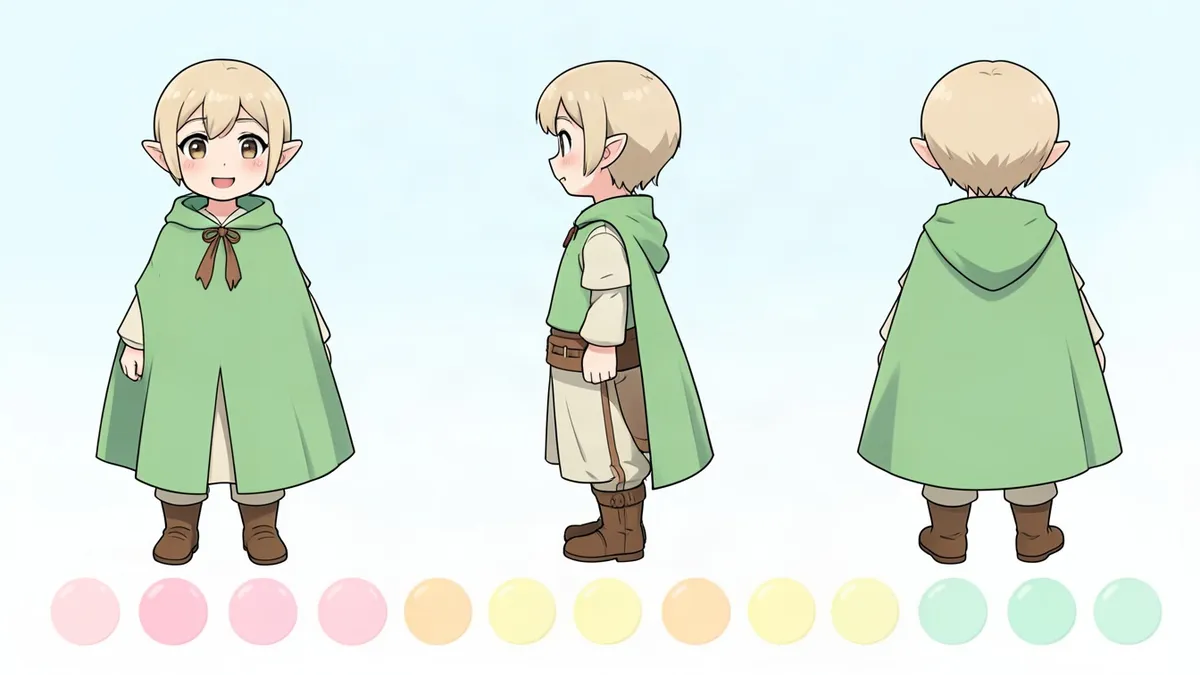
A character reference sheet (or "ref sheet") is a single image that shows everything someone needs to draw your character correctly: what they look like from different angles, their exact colors and the small details that are easy to forget. If you've ever commissioned art of your OC, joined an art trade or drawn the same character twice and noticed the scar moved, you already know why ref sheets matter.
This guide covers what to include, how to lay it out and how to make one even if you're not confident in your drawing skills.
Why make a reference sheet?
- Consistency. Your character looks the same every time, whether you draw them or someone else does.
- Commissions and art trades. Artists need clear references. A good ref sheet saves back-and-forth messages and avoids mistakes.
- Animation, comics and games. Anything with repeated drawings needs a model to follow.
- Design decisions. Putting everything on one page shows you what works and what's cluttered.
What to include on a character reference sheet
1. A full-body front view
This is the most important part. Draw the character standing straight in a neutral pose with arms slightly away from the body so the outfit is visible. Avoid dramatic angles or poses that hide details.
2. A back view (and side view if possible)
A front and back view together is called a turnaround. Hairstyles, capes, tails, wings and backpacks often look very different from behind. A side view helps with hair volume, posture and accessories.
3. A head close-up
Show the face larger than in the full-body view: eye shape, eyebrows, nose, mouth, hairline and any face markings. Many ref sheets include a three-quarter view of the head as well.
4. Expressions
Add three to six small face drawings with different expressions. Include at least one that shows the character's personality: a smug grin, a nervous smile or a tired stare tells people a lot about who your OC is.
5. Color palette
Add color swatches for every main area: skin, hair (with shadow color), eyes, each piece of clothing and accessories. If you work digitally, write the hex codes next to each swatch so other artists can match them exactly.
6. Detail call-outs
Zoom in on anything easy to get wrong:
- Patterns on clothing
- Jewelry, earrings and piercings
- Scars, tattoos, freckles and birthmarks (and which side they're on)
- Weapons, tools, a phone case or a keychain
- Shoes, belts and buttons
7. Basic info
A small text box with the character's name, age, height, pronouns and a one-line personality summary. Some artists add "do" and "don't" notes, such as "always has the left sleeve rolled up" or "never draw without glasses."
Optional extras
- Alternate outfits (casual, formal, sleepwear, battle gear)
- Height comparison with other characters or a human outline
- Hands and weapons drawn larger
- Body proportions for unusual species or builds
How to lay out a ref sheet
- Put the full-body front view on the left and make it the biggest element. It's what people look at first.
- Place the back and side views next to it at the same scale. Draw light horizontal guidelines so the head, waist and feet line up.
- Group expressions together in a row or grid.
- Keep the background plain. White or a light neutral color shows true colors best.
- Use a landscape canvas. A 16:9 or 3:2 canvas gives you enough space for turnarounds and call-outs. At least 3000 pixels wide keeps details readable.
How to make a reference sheet if you can't draw
You still have options:
- Generate a base design. Describe your character in the Character Creator and generate a full-body portrait. Use it as your front view and color reference.
- Collect references. Add photos of real clothing, hairstyles and accessories that match your character.
- Make a collage sheet. Combine your generated portrait, color swatches (picked straight from the image) and written notes in a free design tool.
- Commission an artist. Bring your collage to an artist as a starting point. They'll turn it into a polished turnaround.
If your character is still mostly an idea, start with our OC template to work out the details first.
Reference sheet checklist
- Full-body front view
- Back view (side view optional)
- Head close-up
- Three or more expressions
- Color palette with hex codes
- Detail call-outs
- Name, age, height, pronouns
- Plain background, clear layout
FAQ
What is a character reference sheet?
It's an image that shows a character from several angles along with their colors, expressions and details, so the character can be drawn consistently by you or other artists.
What's the difference between a ref sheet and a character sheet?
People often use the terms interchangeably. Sometimes "character sheet" means a written profile (personality, backstory), while "reference sheet" means the visual guide. Many creators make both.
How many views should a ref sheet have?
At least front and back. Front, side and back is a full turnaround, which is ideal for animation, 3D models and complicated designs.
What size should a reference sheet be?
For digital sheets, a landscape canvas at least 3000 pixels wide is a good minimum. Make sure the smallest details are still clear when you zoom in.
Should a ref sheet be colored?
Yes, if possible. Colors are one of the main things artists need to get right. If you can't color it, add color swatches and labels.